 Baton
Baton Chapter 3
Workspaces
A workspace is a directory of YAML files. On a phone there is no folder an app could keep coming back to, so Baton keeps its workspaces inside the app, on the device, and git sync is how one leaves.
3.1Opening and creating
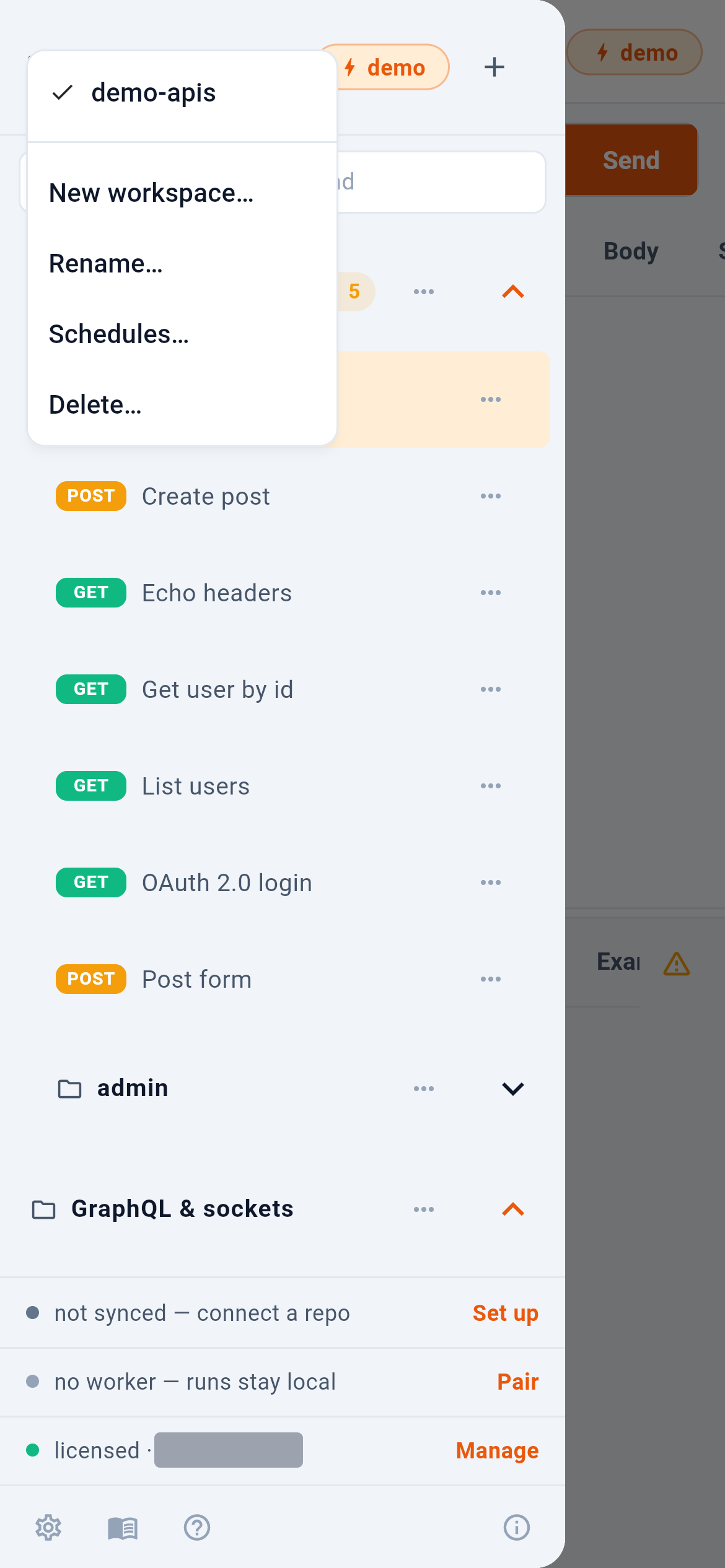
The workspace name at the top of the drawer opens the list. 1 is what you have on this device. 2 adds one — it is created inside the app, so there is no folder to pick. 3 opens the schedules the worker runs. The bundled demo-apis workspace is always there to try things against; it is the one this manual uses throughout.
3.2Settings that belong to the workspace
baton.yaml carries the settings every request in that workspace inherits: request timeout, whether redirects are followed, whether TLS certificates are validated, an extra CA bundle or client certificate, and a proxy. They are edited in Settings, and because they live in the workspace they travel with it through git — a colleague who clones the repository gets the same behaviour.
3.3What a workspace link is
A workspace can be published as a link that opens it: an https:// link to the site, which renders the repository’s coordinates and offers the app, and a baton:// scheme link for platforms with no universal links. Both carry coordinates only. A token, a password or anything resembling a credential in such a link is refused outright rather than quietly stripped.