 Baton
Baton Chapter 1
About Baton
Baton is an API client whose collections, environments and schedules are plain YAML files in a git repository you own. There is no cloud account holding your work and no proprietary sync protocol: the repository is the product’s backbone, so anything git can do — branches, review, history, blame — applies to your requests as well.
It runs from one codebase on macOS, Windows, Linux, iOS, Android and in a browser, and each kind of screen has a guide of its own. This one is for a phone: iPhone and Android. Its screenshots are of the app at a phone’s size, taken from the browser build — Section 15 says how, and what the apps from the App Store and Google Play show differently. On a computer, read the desktop guide.
1.1The pieces
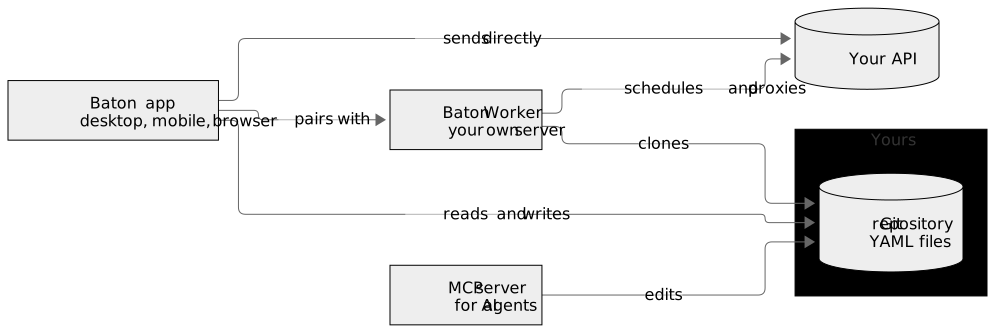
The app is what you are looking at. The worker is an optional server you run yourself — it executes scheduled runs and relays requests for the browser build. The MCP server lets an AI agent — Claude Code, Cursor, VS Code, Codex — read, edit and run requests, on a computer, beside a checkout of the repository. None of them is a service of ours; the worker and the MCP server are programs you start.
1.2What is in a workspace
A workspace is a directory, and everything in it is readable without Baton.
| Path | What it holds |
|---|---|
collections/ | One YAML file per request, in folders that mirror the tree |
environments/ | One file per environment: variable values, and the names of secrets |
schedules/ | What the worker should run, and when |
.baton/ | Run history and local state — not something you edit |
baton.yaml | Workspace settings: timeouts, redirects, TLS, proxy |
1.3What this manual covers
The chapters follow the order you meet things in: the screen, then a workspace and the requests in it, then sending one and reading what came back, then the parts that make a request reusable — variables, secrets, auth, bodies, scripts — and finally collection runs, git sync, the worker, and settings. The last chapter is what the store apps do differently.